
Death Run 3D
Content: Third-party trackers. Shows a sign-in button for Y8, an outside games account. How we label games
 Loading……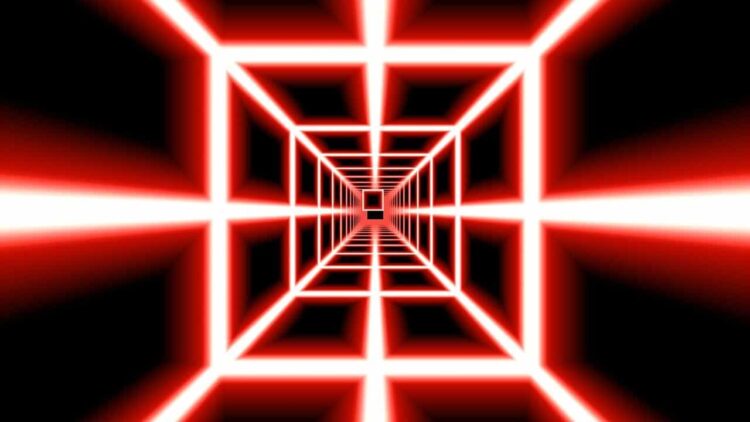
Best on a computer
This one needs a keyboard or mouse, so it will not run well on a phone or tablet. Try one of these instead:
 Geometry DashArcade · 5-15 min
 Geometry Dash Hyper WaveArcade · 2-5 min
 Geometry Dash SubzeroArcade · 2-5 min
 Pac ManArcade · 2-5 min
 Nice break. Ready to get back to it? Back to study
About this game
Death Run 3D puts you in a tiny craft flying through an endless tunnel of cubes at a speed that never stops climbing. There is nothing to collect and no power-ups, just you, your reflexes and a wall of blocks rushing at your face.
Made by another developer and hosted on Brainlag. This game also connects to: Unity (game engine services), Y8 (game portal).
How to play
Pick a track from the Select Track screen and steer through the gaps between the cubes. One touch of a block ends the run. Your score climbs the longer you survive, and the game shows your best for that track next to it.
The speed keeps increasing the whole time, even on the Practice track, which is a short session you can actually finish. The real game starts on Superluminal. Score 500 there to unlock Maelstrom, and 750 to unlock Hyper Superluminal. Score 750 in Maelstrom to open Hyper Maelstrom.
In Settings you can choose the default input (arrow keys, or WASD / ZQSD for AZERTY keyboards), turn the volume on or off, change the menu colour and pick how your score is shown: as a bar, as a number or not at all.
Controls
| Key | Action |
|---|---|
| Arrow keys | Steer (default input: ARROWS) |
| WASD / ZQSD | Steer (if you pick this input in Settings) |
| R | Restart the run instantly |
Tips
- Keep a finger near R. Restarting with one key skips the menus, so you can fire off twenty attempts in the time a few menu clicks would take.
- Look far down the tunnel, not at the cube right in front of you. At high speed you have to start moving toward the next gap before the current one has passed.
- Use small taps rather than holding a direction. Holding too long swings you past the gap and into the next wall.
- If Superluminal feels impossible, run the Practice track for a few minutes. It speeds up the same way, so it is good for getting used to the pace.
- If the flashing colours tire your eyes, lower your screen brightness, as the game itself suggests. Note that the game carries a warning for photosensitive epilepsy.
FAQ
Does it save my progress?
Yes. Your best score on each track and the tracks you have unlocked are stored in this browser, so they are still there next time. Clearing site data or switching to another device starts you from zero.
Can I play on a phone or Chromebook?
It needs a keyboard to steer, so play it on a Chromebook, laptop or desktop. It is not set up for phones or tablets here.
How do I unlock Maelstrom?
Reach a score of 500 on Superluminal. Keep going to 750 there for Hyper Superluminal, and score 750 on Maelstrom to unlock Hyper Maelstrom.