
Hover Racer Drive
 Loading……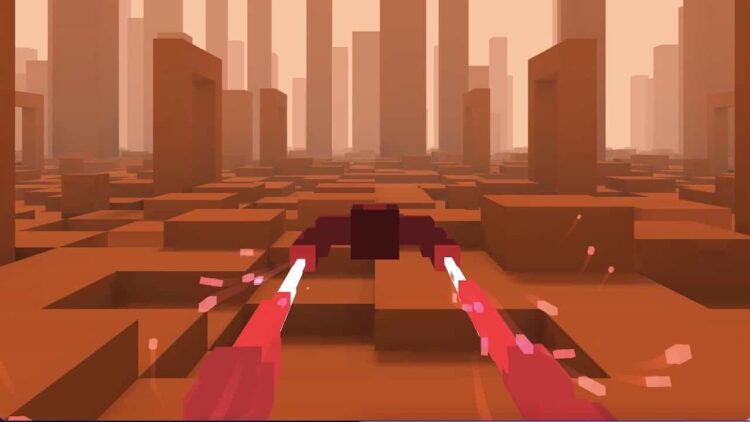
Best on a computer
This one needs a keyboard or mouse, so it will not run well on a phone or tablet. Try one of these instead:
Try anyway

Nice break. Ready to get back to it? Back to study
About this game
Hover Racer Drive puts you in a hovercraft skimming down an endless track full of blocks, moving barriers and canyon sections. You only steer; the craft keeps flying forward and the pace climbs the longer you last. Credits picked up along the way buy new racers in the shop.
Made by another developer and hosted on Brainlag.
How to play
Each run starts at a manageable speed and gets faster as you go, with a Speed Increased! message each time it steps up. Steer left and right around the obstacles in your path: fixed blocks, moving and sliding blocks, and canyon stretches announced by a Canyon Approaching! warning. Crash into something and the run ends.
Your score is the distance you cover, shown as You Travelled on the results screen, and beating your old best earns a NEW RECORD! banner. Credits are scattered over the track, and the results also show how many you collected in that run.
Power-ups appear on the track as well, including Turbo Boost and Slow Motion. Between runs, the X-Racer Shop sells new craft (Red Falcon, Blue Falcon, Silver Falcon, Black Sniper and Golden Sniper) plus Double Credits and Triple Credits, which make every credit count two or three times for one race.
Controls
| Key | Action |
|---|---|
| Left / Right arrow keys | Steer |
| A / D | Steer (alternative keys) |
| Touch controls | Steer on a phone or tablet |
| Mouse click / tap | Menus and shop |
Tips
- Make small moves early. A big swerve at the last moment at high speed tends to carry you straight into the next obstacle.
- With moving and sliding blocks, aim for where the gap will be when you arrive, not where it is right now.
- When Canyon Approaching! flashes up, get back to the middle of the track before the section starts so you have room on both sides.
- Slow Motion is the best moment to thread a tight gap. Turbo Boost is great for distance, so grab it when the track ahead looks clear.
- Save Double or Triple Credits for runs where you feel sharp. They pay off most when you survive deep into the faster sections, where you pass the most credits.
FAQ
Does it save my progress?
The game stores its data, such as your record and credits, with Unity's browser storage, so they should still be there next time in the same browser. Clearing site data or switching device resets them.
Can I play on a phone or Chromebook?
Yes. On a phone or tablet, steer with the touch controls. On a Chromebook, use the arrow keys or A and D.
Is there an end?
No. The track is endless and keeps getting faster, so the goal is always your own longest distance.