
Ice Dodo
 Loading……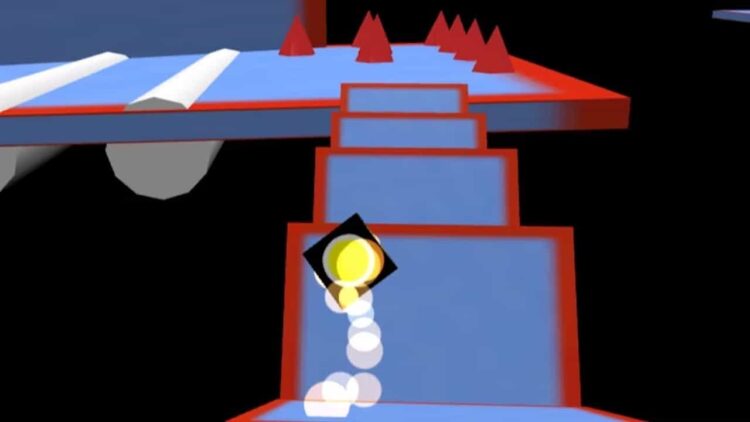
Best on a computer
This one needs a keyboard or mouse, so it will not run well on a phone or tablet. Try one of these instead:
 Geometry DashArcade · 5-15 min
 Geometry Dash Hyper WaveArcade · 2-5 min
 Geometry Dash SubzeroArcade · 2-5 min
 Pac ManArcade · 2-5 min
 Nice break. Ready to get back to it? Back to study
About this game
Ice Dodo is a 3D sliding game where your dodo skims down icy tracks floating in the sky and all you control is left and right. It sounds simple until the track narrows, twists and starts throwing cones and sheer drops at you. Every map is a short sprint, so one more try is always tempting.
Made by another developer and hosted on Brainlag. This game also connects to: public code libraries, Amazon CloudFront (file hosting).
How to play
Pick a map from the menu and your dodo starts sliding forward on its own. Steer left and right to stay on the platform and reach the finish line. Slide off the edge or run into a cone and the attempt is over; press Space to jump straight back in.
This build includes 21 maps, grouped into cups on the menu. They range from gentle starters like Welcome Map and Easy Drifting to harder courses such as Coney Cliffs, Cross Gravity, Space Canyon and Everest.
A timer runs during each attempt and the game keeps your best speedrun time for every map. On the menu, your Dodo Score, Total Completes and Incomplete Maps show how far through the collection you are. You can also pick a dodo skin in the Skins tab.
Controls
| Key | Action |
|---|---|
| Left / Right arrow or A / D | Steer |
| Space | Restart after a fall |
Tips
- Use short taps instead of holding a key down. The ice keeps you drifting after you let go, and over-steering is the most common way to slide off.
- Turn on Auto Restart in Settings so a fall puts you straight back at the start without touching the menu.
- If the track is hard to read against the sky, switch the platform texture between Bright and Dark in Settings.
- Learn how the dodo slides on Welcome Map and Easy Drifting before trying the cone-heavy maps, where one clipped cone ends the run.
- Look further ahead on twisting sections. Starting a turn early and gently is far safer than a late, sharp correction.
FAQ
Does it save my times?
Yes. Your best times and completed maps are stored in your browser's local storage, so they're there next time you visit. They're kept in this browser only, so clearing site data or switching devices resets them.
Can I play on a phone or Chromebook?
It's meant to be played with a keyboard, and this page is set up for keyboard play. A computer or a Chromebook with a keyboard is the way to go.
How do I get a faster time?
Finish first, then go fast. Once you can complete a map reliably, start shaving time by taking smoother lines through the turns and making fewer corrections. Your best time is shown on the results screen so you can see your progress.