
Survival Race
 Loading……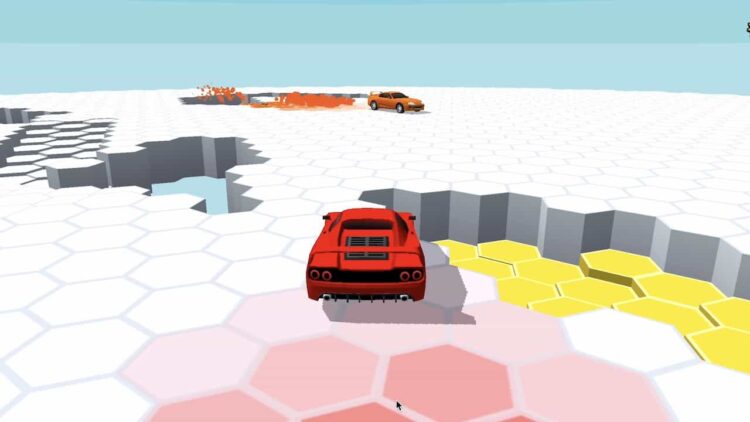
Best on a computer
This one needs a keyboard or mouse, so it will not run well on a phone or tablet. Try one of these instead:
Try anyway

Nice break. Ready to get back to it? Back to study
About this game
Survival Race is a car brawler with three games in one. In Battle you shove rival supercars off an arena that keeps shrinking, in Parkour you jump pits and hunt for keys and stars, and in Autoball you ram giant balls into a goal. Rounds are short, the physics are bouncy, and doing well unlocks new cars.
Made by another developer and hosted on Brainlag.
How to play
Choose a mode, pick a car in the garage and go. Drive and steer with the arrow keys or WASD, and press Space to jump. Each round opens with a short message that tells you what to do.
Battle: survive against the other supercars. Kick your rivals out while the arena shrinks around you, and be the last car left. Parkour: jump over the pits and collect as many keys as you can, along with stars and coins, before time runs out. Autoball: score as many goals as possible by knocking the balls into the goal. Pickups such as coins, nitro, health and rage turn up on the maps.
Rounds earn coins and move you up the ranks of each mode's league. New cars are unlocked through tasks: collecting coins, kicking rivals, winning races, raising your rank and doing roll jumps, which means jumping while you drift.
Controls
| Key | Action |
|---|---|
| Arrow keys / WASD | Drive and steer |
| Space | Jump |
| Touch controls | Drive on a phone or tablet |
| Mouse click / tap | Menus, garage and settings |
Tips
- In Battle, stay away from the rim as the arena shrinks. The edge is where you get knocked out, so let rivals fight each other out there.
- Hit rivals from the side rather than head-on. A side impact pushes them sideways toward the edge, while a head-on crash often just stops you both.
- Roll jumps count toward unlocking cars. Start a drift through a turn and press Space while you are still sliding.
- If the car feels twitchy on a keyboard, open Settings and try the smooth steering option or a different drift level.
- In Parkour, slow down before a pit. A short, controlled jump lands far more often than flying at it flat out.
- Rotate between modes. Each one feeds different tasks, so playing all three unlocks cars faster than grinding just one.
FAQ
Does it save my progress?
The game keeps its save data locally in your browser, so cars and ranks should still be there next time in the same browser. Clearing site data or switching to another device resets them.
Can I play on a phone or Chromebook?
Yes. It has touch controls for phones and tablets. On a Chromebook, drive with the arrow keys or WASD and jump with Space.
How do I unlock new cars?
Open a locked car in the garage to see its task, such as collecting coins, kicking rivals, winning races, raising your rank or doing roll jumps, then play the mode that suits that task.